Conventions
This page lists the various conventions TinyFFR uses (in no particular order):
3D Handedness / Orientation#
-
The world and any local 3D space is by default right-handed:
- +X points left
- +Y points up
- +Z points forward
-
Rotations in 3D are specified as an angle and an axis
- The angle specifies an anti-clockwise angle when the axis is pointing towards you
- Alternatively: The angle specifies a clockwise angle when looking along/"down" the axis
2D Handedness / Orientation#
-
In most contexts any 2D system follows trigonometric / cartesian defaults:
- +X points right
- +Y points up
(0, 0)/origin is at the bottom-left corner
-
2D rotations are always assumed to be anti-clockwise when the angle is positive
-
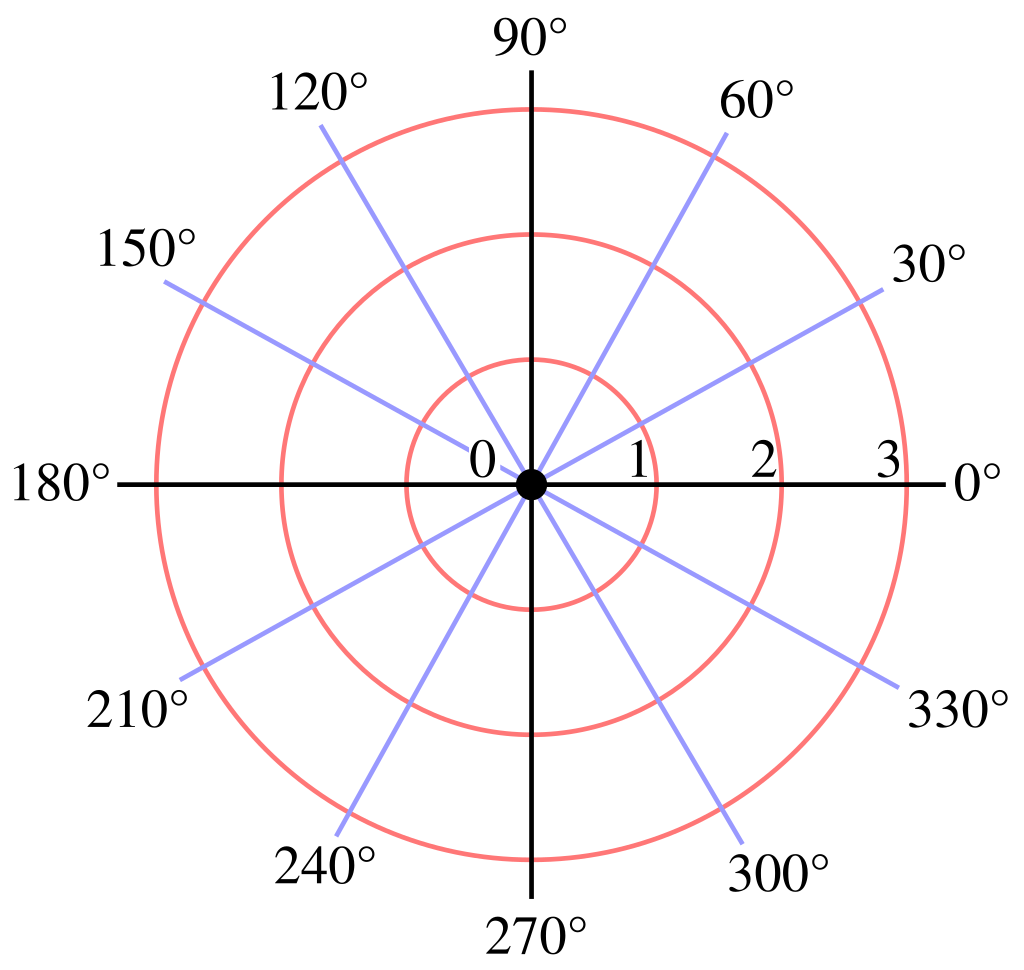
2D angles are always in polar form, e.g. right is 0°, up is 90°, left is 180°, down is 270°:
Exception: Windows / Desktop Pixels & Cursor Position
- When dealing specifically with window and/or desktop pixel co-ordinates, the top-left corner is the
(0, 0)origin point, therefore:- +X points right
- +Y points down
This also affects the mouse/pointer tracking, therefore properties like CursorDelta follow this convention.
Textures & Materials#
- Texture origins (
(0, 0)) start at the bottom-left corner.- This includes render output buffer readbacks unless they are specifically requested in inverted order
- Normal maps (after encoding as a 3D vector):
- +X points towards the positive mesh tangent direction
- +Y points towards the positive mesh bitangent direction
- +Z points out of the texture, up away from the surface. Normal maps' Z should always be positive or 0, never negative.
- Normal maps expected in "OpenGL"/"GL" format. Not "DirectX"/"DX" format.
- ORM maps:
- Occlusion: Max value is brightest (least occlusion), min value is darkest (most occlusion). Is used as a multiplier for indirect lighting.
Units#
- Scalar values (e.g.
float) are assumed to be in meters- This is just a convention, nothing happens if you break it unless you wish to use "real-world" values for lighting
Front-Face Winding Order#
- TinyFFR expects front-facing polygons/triangles to be in anti-clockwise (
 counterclockwise) order.
Math#
-
All
IVecttypes are four floating point values internally. When converting toVector4theWvalue will be set accordingly:VectW value is 0fDirectionW value is 0fLocationW value is 1f
-
Direction.FromDualOrthogonalization()follows the right-hand rule (first argument is index finger, second argument is middle finger, result is thumb). -
All matrices are row-vector, row-major
-
Transformmatrix is laid out in following format:var rotVect = RotationQuaternion.AsVector4(); var rotVectSquared = rotVect * rotVect; var rowA = new Vector4( 1f - 2f * rotVectSquared.Y - 2f * rotVectSquared.Z, 2f * rotVect.X * rotVect.Y + 2f * rotVect.Z * rotVect.W, 2f * rotVect.X * rotVect.Z - 2f * rotVect.Y * rotVect.W, 0f ) * Scaling.X; var rowB = new Vector4( 2f * rotVect.X * rotVect.Y - 2f * rotVect.Z * rotVect.W, 1f - 2f * rotVectSquared.X - 2f * rotVectSquared.Z, 2f * rotVect.Y * rotVect.Z + 2f * rotVect.X * rotVect.W, 0f ) * Scaling.Y; var rowC = new Vector4( 2f * rotVect.X * rotVect.Z + 2f * rotVect.Y * rotVect.W, 2f * rotVect.Y * rotVect.Z - 2f * rotVect.X * rotVect.W, 1f - 2f * rotVectSquared.X - 2f * rotVectSquared.Y, 0f ) * Scaling.Z; return new Matrix4x4( rowA.X, rowA.Y, rowA.Z, rowA.W, rowB.X, rowB.Y, rowB.Z, rowB.W, rowC.X, rowC.Y, rowC.Z, rowC.W, Translation.X, Translation.Y, Translation.Z, 1f ); -
Cameraperspective projection matrix is laid out in following format:var near = parameters.NearPlaneDistance; var far = parameters.FarPlaneDistance; var h = MathF.Tan(parameters.VerticalFovRadians * 0.5f) * near; var w = h * parameters.AspectRatio; var left = -w; var right = w; var bottom = -h; var top = h; return new Matrix4x4( (near * 2f) / (right - left), 0f, 0f, 0f, 0f, (near * 2f) / (top - bottom), 0f, 0f, (right + left) / (right - left), (top + bottom) / (top - bottom), -(far + near) / (far - near), -1f, 0f, 0f, -(2f * far * near) / (far - near), 0f ), -
Cameramodel matrix is laid out in following format:var p = parameters.Position.ToVector3(); var z = parameters.ViewDirection.ToVector3(); var x = Vector3.Cross(z, parameters.UpDirection.ToVector3()); var y = Vector3.Cross(x, z); z = -z; return new Matrix4x4( m11: x.X, m12: x.Y, m13: x.Z, m21: y.X, m22: y.Y, m23: y.Z, m31: z.X, m32: z.Y, m33: z.Z, m41: p.X, m42: p.Y, m43: p.Z, m14: 0f, m24: 0f, m34: 0f, m44: 1f );
-