Dynamic Meshes & Mutable Grids
-
 In a nutshell...
- Mutable grids are flat sheets of vertices that can be raised, lowered, and shifted; ideal for water, terrain, cloth, and graphs. Mutable Grids
- Meshes created with
AllowsPerInstanceVertexMutationlet each object reshape its own copy of the mesh's vertices. Per-Instance Vertex Mutation - A
DynamicVertexBufferholds vertices and triangles that can be rewritten from scratch at any time, for geometry generated as your application runs. Dynamic Vertex Buffers
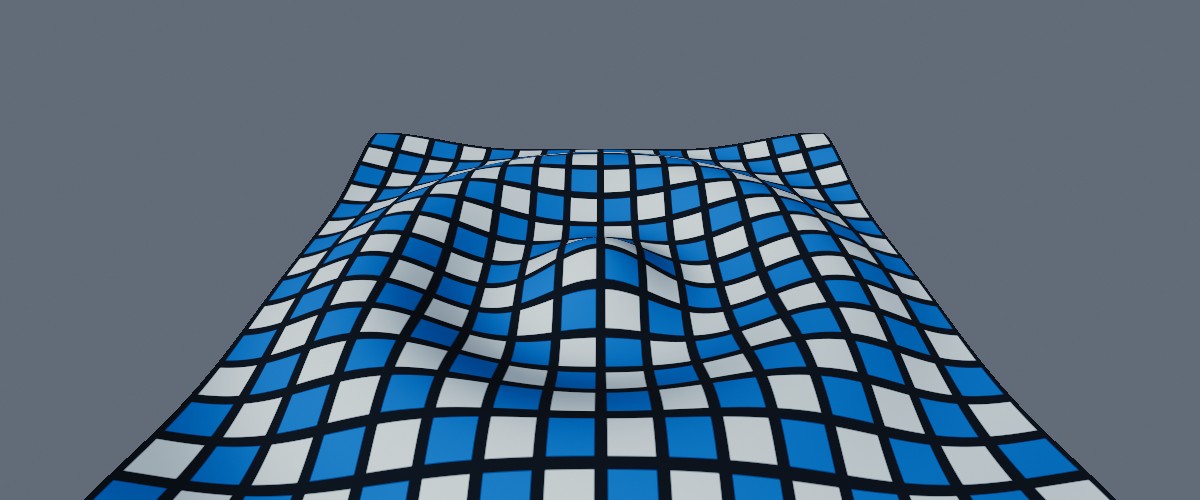
A 128x128 mutable grid, displaced in to a ripple (with recalculateNormals: true, so that it's lit according to its shape).
Dynamic Meshes#
Ordinarily, a mesh's geometry is fixed once it's been created/loaded. Objects can be moved, rotated, and scaled, but the shape of the mesh itself never changes. When you need geometry that changes as your application runs, TinyFFR offers three options:
| If you want to... | Use |
|---|---|
| Raise, lower, or shift points on a surface (e.g. water, terrain, cloth, or a graph of a function) | Mutable Grids |
| Reshape individual objects that are otherwise copies of an existing mesh (e.g. denting, squashing, or wobbling them) | Per-Instance Vertex Mutation |
| Generate geometry yourself from scratch, and regenerate it whenever it changes (e.g. procedural shapes, trails, or visualisations whose size varies) | Dynamic Vertex Buffers |
All three work the same basic way: You borrow a span of the geometry's data, write to it, and then dispose the lease. Nothing reaches the GPU until the lease is disposed, so all the changes you make with one lease are uploaded together (see Leases & Bounding Boxes).
Mutable Grids#
using var gridMesh = factory.MeshBuilder.CreateMutableGrid(
    new XYPair<int>(128, 128), // (1)!
    maxHeightDisplacement: 0.3f // (2)!
);
using var grid = factory.ObjectBuilder.CreateMutableGridInstance(
    gridMesh,
    material,
    position: Location.Origin,
    size: new XYPair<float>(6f, 6f) // (3)!
);
scene.Add(grid);

var elapsedTime = 0f;

// In your application loop:
elapsedTime += deltaTime;
using (var lease = grid.BorrowVerticesSpan(permitLateralDisplacement: false)) { // (4)!
    for (var i = 0; i < lease.Span.Length; ++i) {
        var coord = grid.GetVertexCoordinateNormalized(i); // (5)!
        lease.Span[i] = new MutableGridVertex(0.25f * MathF.Sin(coord.X * 20f + elapsedTime * 3f)); // (6)!
    }
}
-
A grid of 128x128 vertices.
-
The furthest any vertex will be raised or lowered, in metres. This isn't enforced, but is used to size the grid's bounding box (see below).
-
Places the grid at the origin, 6m across in both directions.
-
Borrows the grid's displacements. The new shape is applied when the lease is disposed (i.e. at the end of the
usingblock). -
Gets the vertex's position across the grid, from
-0.5to0.5in each direction for a centred grid. -
Raises or lowers each vertex in to a wave that moves across the grid over time.
A mutable grid is a flat, square sheet of vertices that can each be displaced at runtime. Mutable grids are ideal for surfaces such as water, rolling terrain, or cloth, and for visualising mathematical functions or data over a plane. They are often paired with a writable texture when the surface's appearance needs to change too.
A grid comes in two parts:
- A
MutableGridMesh, created withfactory.MeshBuilder.CreateMutableGrid(), is the flat, undisplaced grid. It can be used anywhere aMeshcan (and itsUnderlyingMeshproperty gives theMeshit wraps). - A
MutableGridInstance, created withfactory.ObjectBuilder.CreateMutableGridInstance(), is a grid placed in the scene. Each instance has its own displacements, so many differently-shaped surfaces can share one grid mesh.
Creating Grid Meshes#
CreateMutableGrid() has two main overloads:
CreateMutableGrid(meshDensity)takes aQualityvalue fromVeryLow(32x32 vertices) toVeryHigh(512x512 vertices), withStandardbeing 128x128.CreateMutableGrid(gridDimensions, ...)takes an exact number of vertices across and down (each at least2), plus the following optional arguments:
-
maxHeightDisplacement -
The furthest (in metres) you intend to raise or lower any vertex. Defaults to
1f.A grid's bounding box is sized to fit this displacement when the grid is created, and is not recalculated as the grid's vertices move (doing so for every displacement would be slow). If you displace vertices further than this, parts of the grid may disappear when they should be on screen, or be missed by scene queries. Setting it far larger than necessary, on the other hand, makes the renderer draw the grid when it's actually off screen.
-
twoSided -
Whether the grid can be seen from underneath as well as from above. Defaults to
true. -
xDir/yDir/upDir -
The directions of the grid's two axes and of its "up" (the direction vertices are raised in). Default to
Direction.Right,Direction.Forward, andDirection.Uprespectively, i.e. a grid lying flat on the ground. -
textureTransform -
A
Transform2Dapplied to the grid's texture coordinates (see Texture Pattern Transforms). By default a texture is stretched exactly once across the whole grid. -
gridOrigin -
Which corner of the grid (or its centre, the default) sits at the grid's position.
Denser grids deform more smoothly, but cost more to draw and to update.
Displacing Vertices#
grid.BorrowVerticesSpan() returns a lease over one MutableGridVertex per grid vertex. Each MutableGridVertex has two values:
-
Height -
How far the vertex is raised (or lowered, if negative) along the grid's up direction.
-
NormalizedLateralOffset -
How far the vertex is shifted across the grid, along its two axes. An offset of
1fshifts the vertex halfway to its neighbour.This is ignored unless
permitLateralDisplacementistruewhen borrowing the span. Leave itfalsewhen you only need heights, as that's cheaper.
The values are absolute displacements from the flat grid (not additions to the grid's current shape), and they persist between leases: Any vertex you don't write to keeps the displacement you last gave it.
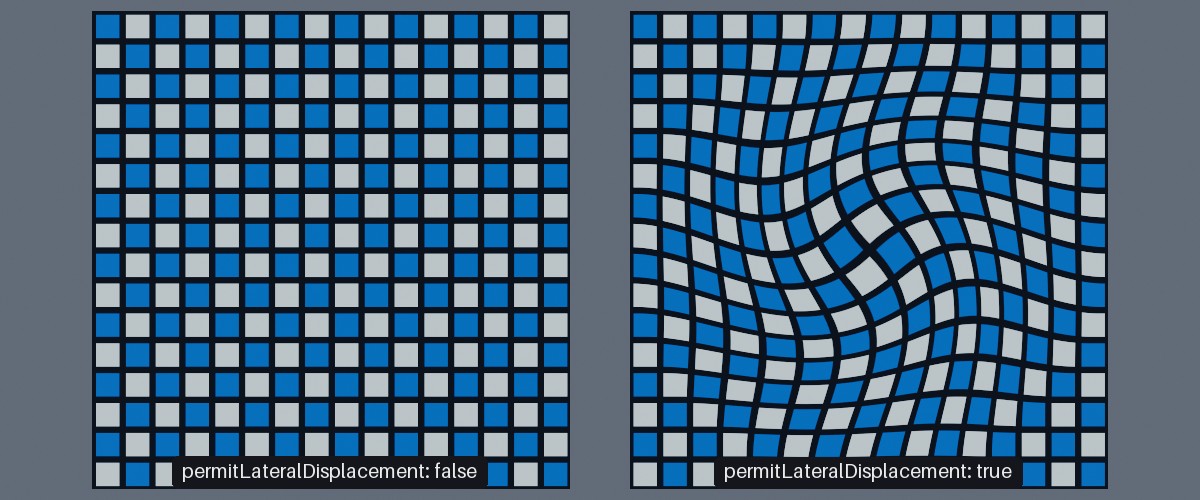
Two grids given the same swirling lateral offsets. The left grid's span was borrowed with permitLateralDisplacement: false, so its offsets were ignored.
The vertices are laid out row by row, starting at the grid's first corner (the bottom-left, looking down from above on a default grid). To find where each vertex is on the grid:
GetVertexCoordinate(index)returns the vertex's integer grid coordinate (e.g.(0, 0)to(127, 127)on a 128x128 grid); andGetVertexIndex(coordinate)does the opposite.GetVertexCoordinateNormalized(index)returns the vertex's position across the grid as a fraction, relative to the grid's origin (so from-0.5to0.5for a centred grid, or0to1for a grid whose origin is a corner). This is usually the most convenient input for a wave, slope, or other function of position. These values are precalculated when the instance is created, so they're cheap to read every frame.
For large grids, grid.WriteVerticesParallelized() writes the displacements across TinyFFR's worker threads instead; see Writing in Parallel.
Lighting Displaced Grids#
using (var lease = grid.BorrowVerticesSpan(permitLateralDisplacement: false, recalculateNormals: true)) { // (1)!
    // ...
}
- Recalculates the direction the grid's surface faces at every vertex when the lease is disposed.
By default, when changing a grid's vertices TinyFFR does not recalculate its lighting properties (i.e. its normals, tangents, etc). The grid will therefore be lit as though it were still flat. Its shape still shows through its outline, its texture, and the shadows it casts, but slopes facing towards or away from the light are not shaded any differently.
In some cases this is fine (especially if you're using a non-lit material anyway); and it's the default because it's more performant.
However, passing recalculateNormals: true when borrowing the span recalculates the direction the surface faces at every vertex from the grid's displaced shape so that the grid remains lit correctly. This costs extra time each time the lease is disposed (proportional to the number of vertices in the grid), so leave it false for grids whose displacement is gentle, or that use a lighting-ignoring material.
Placing Grids#
A grid mesh is built at a fixed size, and scaled in to place by its instance's transform. Use grid.SetTransform(position, size) (or the position and size arguments when creating the instance) to place and size a grid in metres along its own two axes. This doesn't scale the grid's up direction, so heights stay in metres however large the grid is (gridMesh.CalculateTransform(position, size) returns the equivalent Transform).
A grid instance is otherwise a normal scene object. It can be moved, rotated, and scaled like any other object, and its UnderlyingModelInstance property gives the ModelInstance it wraps.
Per-Instance Vertex Mutation#
using var mesh = factory.MeshBuilder.CreateSphere(
    new Sphere(0.6f),
    subdivisionLevel: 4,
    new MeshGenerationConfig(),
    new MeshCreationConfig { AllowsPerInstanceVertexMutation = true } // (1)!
);
using var instance = factory.ObjectBuilder.CreateModelInstance(mesh, material);

using (var originalVertices = mesh.BorrowDefaultVerticesSpan()) // (2)!
using (var lease = instance.BorrowVerticesSpan(recalculateBoundingBoxOnLeaseDispose: true)) { // (3)!
    for (var i = 0; i < lease.Span.Length; ++i) {
        var original = originalVertices.Span[i];
        var location = original.Location;
        var squash = 1f + 0.35f * MathF.Sin(location.Y * 9f);
        lease.Span[i] = original with { Location = new Location(location.X * squash, location.Y, location.Z * squash) }; // (4)!
    }
}
-
Allows each instance of this mesh to alter its own vertices.
-
Borrows the mesh's original, unaltered vertices (read-only).
-
Borrows this instance's own vertices for writing. When the lease is disposed, the changes are uploaded and the instance's bounding box is recalculated.
-
Squashes and stretches the sphere in to rings. Every other property of the vertex is kept as it was.
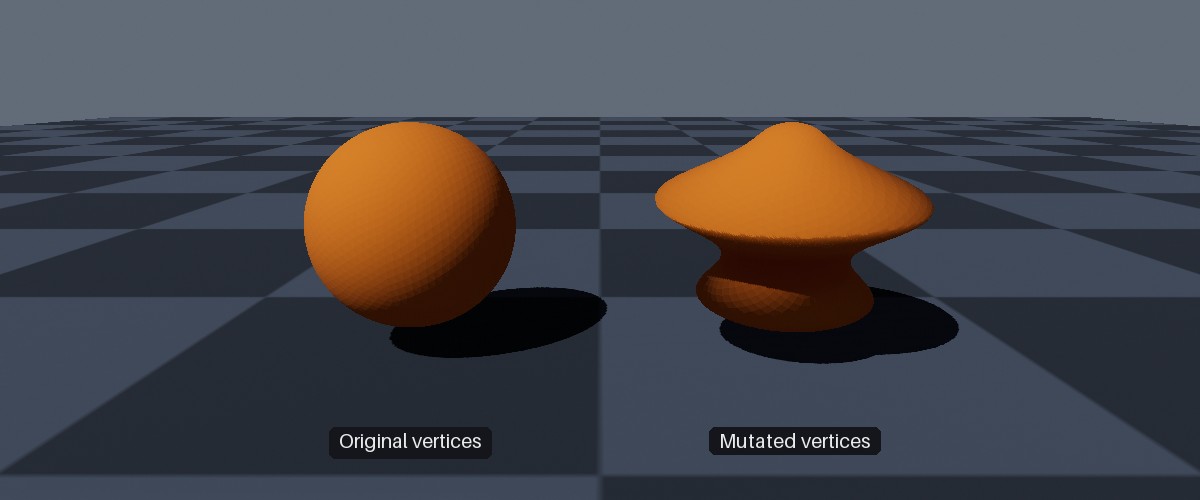
Two instances of the same sphere mesh. The right-hand instance's vertices have been mutated as in the example above.
A mesh created with AllowsPerInstanceVertexMutation set to true in its MeshCreationConfig lets every object using it reshape its own copy of the mesh's vertices, without affecting other objects using the mesh. This can only be set when the mesh is created; you can check it with mesh.AllowsPerInstanceVertexMutation (or instance.AllowsVertexMutation).
The mesh's vertices can then be accessed as follows:
-
instance.BorrowVerticesSpan(recalculateBoundingBoxOnLeaseDispose) -
Borrows the instance's vertices for writing. The changes are uploaded when the lease is disposed. See Leases & Bounding Boxes for more info on
recalculateBoundingBoxOnLeaseDispose.Another overload takes a
Rangeto borrow only some of the vertices (e.g.instance.BorrowVerticesSpan(true, 100..200)). Only the borrowed range is uploaded, which is much cheaper when only a few vertices change. -
instance.BorrowVerticesSpanReadOnly() -
Borrows the instance's current vertices for reading only.
-
mesh.BorrowDefaultVerticesSpan() -
Borrows the mesh's original vertices for reading only. Starting from these each time (rather than from the instance's current vertices) avoids errors building up over many changes.
All three throw an InvalidOperationException if the mesh wasn't created with AllowsPerInstanceVertexMutation set to true.
The vertices are MeshVertex values (explained in Creating Meshes). Each holds a location, texture coordinates, and a tangent rotation, which describes the direction the surface faces at that vertex and is used for lighting. If you move vertices far enough to change the direction the surface faces, also update their tangent rotation (e.g. by creating new MeshVertex values with the MeshVertex(location, textureCoords, tangent, bitangent, normal) constructor), or the surface will be lit as though it had its original shape.
Things to note about per-instance vertex mutation:
- Meshes allowing per-instance vertex mutation keep a copy of their vertices in ordinary memory as well as on the GPU. Each instance then gets its own copy of the vertices (in memory and on the GPU) the first time it borrows them; instances that never borrow their vertices cost nothing extra.
- Changing an instance's
Meshdiscards its altered vertices. - Wireframe data is never generated for meshes allowing per-instance vertex mutation (see The Default Material).
- Only vertices can be altered, not the triangles joining them. To change which vertices are joined together, use a dynamic vertex buffer instead.
instance.WriteVerticesParallelized()andinstance.ReadVerticesParallelized()process the vertices across TinyFFR's worker threads; see Writing in Parallel.
Dynamic Vertex Buffers#
using var buffer = factory.MeshBuilder.CreateDynamicVertexBuffer(
    initialVertexCapacity: 1000,
    initialTriangleCapacity: 1000
);

using (var vertices = buffer.BorrowVerticesSpan(recalculateBoundingBoxOnLeaseDispose: true, overwriteChildMeshBoundingBoxes: true)) // (1)!
using (var triangles = buffer.BorrowTrianglesSpan(recalculateBoundingBoxOnLeaseDispose: false, overwriteChildMeshBoundingBoxes: false)) {
    WriteMyGeometry(vertices.Span, triangles.Span); // (2)!
}

using var mesh = buffer.CreateMesh(); // (3)!
using var instance = factory.ObjectBuilder.CreateModelInstance(mesh, material);
-
Borrows the buffer's vertices. When the lease is disposed, the new vertices are uploaded, and the bounding box of the buffer (and every mesh created from it) is recalculated.
-
Writes vertices in to the first span, and the triangles joining them in to the second, via some hypothetical method of your own.
-
Creates a mesh that draws the buffer's contents.
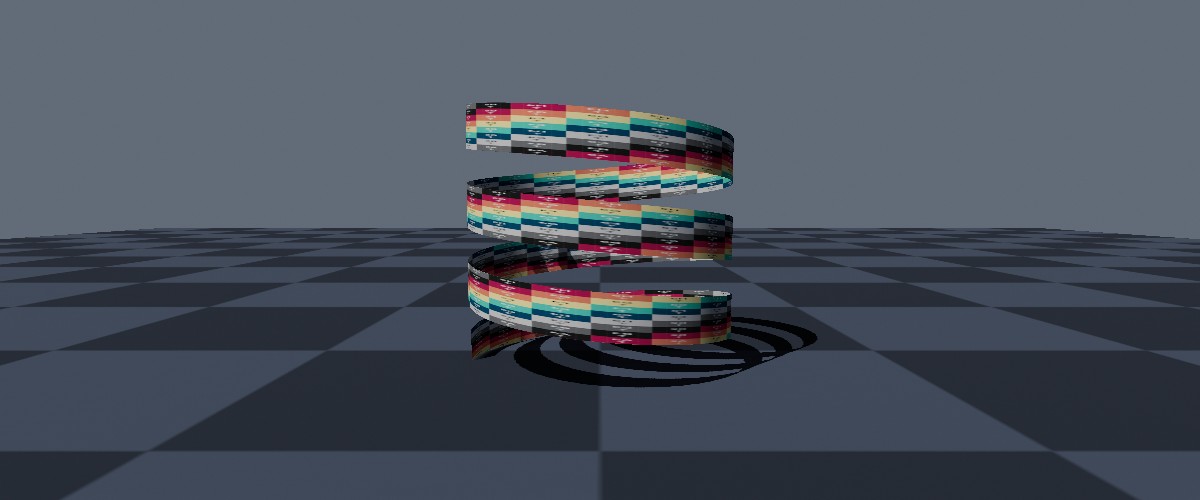
A spiral ribbon generated in to a dynamic vertex buffer.
A DynamicVertexBuffer holds vertices and triangles that you write yourself, and that can be rewritten at any time. It's the right choice for geometry that you generate from scratch as your application runs (rather than altering an existing mesh), especially when the amount of geometry varies.
Dynamic vertex buffers are created with factory.MeshBuilder.CreateDynamicVertexBuffer(), with an initial capacity of vertices and triangles. Both start out filled with zeros.
You can create multiple meshes as "views" from a single dynamic buffer.
Writing Geometry#
buffer.BorrowVerticesSpan() borrows the buffer's vertices (as MeshVertex values; see Creating Meshes), and buffer.BorrowTrianglesSpan() borrows its triangles (as VertexTriangle values; see Creating Meshes). Both have an overload that takes a Range to borrow only part of the buffer, which is cheaper to upload; and BorrowVerticesSpanReadOnly() / BorrowTrianglesSpanReadOnly() read the buffer without altering it.
Each triangle's three indices refer to vertices in the buffer, so must each be less than the buffer's vertex capacity; and, as for every VertexTriangle, must be in anticlockwise order as seen from the triangle's front face. Triangles left at their default value (all three indices zero) have no area, and so draw nothing.
The buffer's vertices and triangles can also be written (or read) across TinyFFR's worker threads; see Writing in Parallel.
Creating Meshes#
A buffer is drawn by creating meshes from it:
-
buffer.CreateMesh() -
Creates a mesh that draws every triangle in the buffer.
-
buffer.CreateMesh(trianglesRange) -
Creates a mesh that draws only the given range of the buffer's triangles (e.g.
buffer.CreateMesh(0..100)draws the first 100 triangles). One buffer can therefore hold several separate pieces of geometry, each drawn with its own mesh. -
buffer.CreateMesh(trianglesRange, boundingBoxOverride) -
As above, but with a bounding box of your own (see below).
A mesh created from a buffer is a view on to the buffer, not a copy of it. Rewriting the buffer changes what the mesh draws, without needing to create a new mesh (this is specifically a supported workflow). A mesh's triangle range is fixed when the mesh is created.
Bounding Boxes#
Like every mesh, meshes created from a buffer have a bounding box, which is used to skip drawing objects that are off screen (see Leases & Bounding Boxes). A buffer keeps a bounding box of its own, which is given to every mesh created from it:
- A new buffer's bounding box encloses its zero-filled vertices; i.e. it's a tiny box at the origin. If you create a mesh before writing to the buffer, the mesh keeps this tiny box unless you update it, and objects using the mesh will disappear whenever the origin is off screen.
- Passing
overwriteChildMeshBoundingBoxes: truewhen borrowing the buffer's spans updates the bounding box of every mesh created from the buffer (and every object using those meshes) whenever the buffer's bounding box changes. Passingfalseupdates only the buffer's own bounding box, which is then given to meshes created afterwards. buffer.TriggerManualBoundingBoxRecalculation(overwriteChildMeshBoundingBoxes)recalculates the buffer's bounding box from its current vertices.buffer.SetBoundingBox(boundingBox, overwriteChildMeshBoundingBoxes)sets the buffer's bounding box explicitly; andbuffer.SetBoundingBox(mesh, boundingBox)sets the bounding box of one mesh created from the buffer. Setting a box you already know is much cheaper than recalculating one.
The buffer's bounding box encloses all of its vertices. When one buffer holds several separate pieces of geometry, give each mesh its own bounding box (via CreateMesh(trianglesRange, boundingBoxOverride) or SetBoundingBox(mesh, boundingBox)) so that each piece is only drawn when it's actually on screen.
Resizing & Disposal#
buffer.ResizeVertexBuffer(newSize) and buffer.ResizeTriangleBuffer(newSize) change the buffer's capacity, keeping as much of its existing contents as fits. A buffer is never resized automatically; and resizing is relatively slow, so choose initial capacities close to what you'll actually need.
A buffer can not be resized or disposed while any mesh created from it still exists (both throw a ResourceDependencyException), or while any of its spans are borrowed. Dispose every mesh created from a buffer (and every object using those meshes) first. buffer.VertexBufferSize and buffer.TriangleBufferSize give the buffer's current capacities.
Writing in Parallel#
Writing tens of thousands of vertices every frame can take a significant amount of time on a single thread. Each form of dynamic mesh therefore also has ...Parallelized() methods, which split the vertices in to blocks and process them at the same time on TinyFFR's worker threads:
sealed class WaveState {
    public required Memory<XYPair<float>> NormalizedCoords { get; init; }
    public float Time;
}

static void WriteWaves(Span<MutableGridVertex> band, XYPair<int> bandOffset, XYPair<int> bandDimensions, WaveState state) { // (1)!
    var coords = state.NormalizedCoords.Span;
    var firstIndex = bandOffset.Y * bandDimensions.X; // (2)!
    for (var i = 0; i < band.Length; ++i) {
        var coord = coords[firstIndex + i];
        band[i] = new MutableGridVertex(MathF.Sin(coord.X * 20f + state.Time) * 0.05f);
    }
}

// Once, after creating the grid:
var gridArea = grid.ParentGridMesh.GridDimensions.Area;
var state = new WaveState { NormalizedCoords = factory.ResourceAllocator.CreatePooledMemoryBuffer<XYPair<float>>(gridArea) }; // (3)!
for (var i = 0; i < gridArea; ++i) state.NormalizedCoords.Span[i] = grid.GetVertexCoordinateNormalized(i); // (4)!

// Every frame:
state.Time = totalTime;
grid.WriteVerticesParallelized(&WriteWaves, state, permitLateralDisplacement: false, recalculateNormals: true); // (5)!
-
The callback must be a
staticmethod (passed as a function pointer, so calling code must be in anunsafecontext). Anything it needs is passed in as the context argument (herestate), rather than captured in a lambda, so that the call doesn't allocate. -
Grids are split in to bands of whole rows.
bandOffset.Yis the grid row the band starts on, so the vertex at positioniin the band has the vertex indexbandOffset.Y * bandDimensions.X + i. -
This borrows a long-lived buffer without allocating on the managed heap, thus preventing GC stutter. Explained further in Avoiding GC Stutter.
-
GetVertexCoordinateNormalized()is a TinyFFR call, and callbacks must never call TinyFFR, so the coordinates are copied out once in advance. -
Works out every band on the worker threads (and the calling thread), then applies the displacements (and, here, recalculates the normals) exactly as when a borrowed span is disposed.
The parallelized methods are:
-
grid.WriteVerticesParallelized(blockCallback, context, permitLateralDisplacement, recalculateNormals) -
Writes the grid's displacements in bands of whole rows, then applies them.
blockCallbackis invoked with(band, bandOffset, bandDimensions, context).grid.ReadVerticesParallelized(blockCallback, context)reads the current displacements in the same way. -
instance.WriteVerticesParallelized(blockCallback, context, recalculateBoundingBoxOnLeaseDispose) -
Writes the instance's vertices in contiguous blocks, then uploads them.
blockCallbackis invoked with(block, startIndex, context), wherestartIndexis the index of the block's first vertex. An overload takes aRangeto write only some of the vertices (startIndexis then relative to the start of the range); andinstance.ReadVerticesParallelized(blockCallback, context)reads the vertices. -
buffer.WriteVerticesParallelized(blockCallback, context, recalculateBoundingBoxOnLeaseDispose, overwriteChildMeshBoundingBoxes) -
As above, for a dynamic vertex buffer's vertices; and
buffer.WriteTrianglesParallelized()does the same for its triangles. Both haveRangeoverloads, andbuffer.ReadVerticesParallelized()/buffer.ReadTrianglesParallelized()read the buffer.
- Each method borrows the span, processes it in parallel, and disposes the lease for you; so everything below about leases and bounding boxes applies exactly as if you'd borrowed the span yourself.
- The calling thread works on blocks too, and the method only returns once every block is done.
- Callbacks run on worker threads, so they must not call any TinyFFR API, and must only write to the block they're given. See Parallelization for the full rules (and for parallelizing your own work in general).
- Small numbers of vertices are simply processed on the calling thread, and parallelization only pays off when each vertex takes real work to compute (e.g. evaluating a function, or calculating normals). Measure before and after.
Leases & Bounding Boxes#
For general information on what bounding boxes are and how they're used in TinyFFR, see Bounding Boxes.
All three forms of dynamic mesh share the following rules:
- Changes are only uploaded to the GPU when the lease is disposed, so make all of a frame's changes with as few leases as possible. Several leases can be held at once.
- Dispose every lease as soon as you're done with it: A model instance or grid instance can not be disposed (nor can an instance's
Meshbe changed) while any of its vertex spans are borrowed, and a dynamic vertex buffer can not be resized or disposed while any of its spans are borrowed. - Every object has a bounding box: A box enclosing its geometry, which the renderer uses to skip drawing objects that are entirely off screen, and which scene queries use to find objects. Moving vertices does not automatically update an object's bounding box, and a bounding box that no longer encloses the object can make it disappear when it should still be on screen, or be missed by scene queries.
For per-instance vertex mutation and dynamic vertex buffers, recalculateBoundingBoxOnLeaseDispose: true recalculates the bounding box from the new vertices when the lease is disposed. Recalculating takes time proportional to the number of vertices, so if you know the extents of your geometry in advance, it's cheaper to pass false and set the bounding box yourself (instance.SetModelSpaceBoundingBox() for instances; buffer.SetBoundingBox() for buffers), or to recalculate it later with TriggerManualBoundingBoxRecalculation().
Mutable grids never recalculate their bounding box; they rely on the maxHeightDisplacement given when the grid mesh was created (see Creating Grid Meshes).