Writable Textures
-
 In a nutshell...
- A texture created with
AllowsDynamicWrites = truecan have its texels overwritten at any time after creation. Writable Textures texture.OverwriteTexels()replaces either the whole texture or a rectangular region of it. Overwriting Texelstexture.OverwriteTexelsParallelized()lets you generate the new texels across TinyFFR's worker threads, writing them straight in to the upload buffer. Overwriting Texels in Parallel
- A texture created with
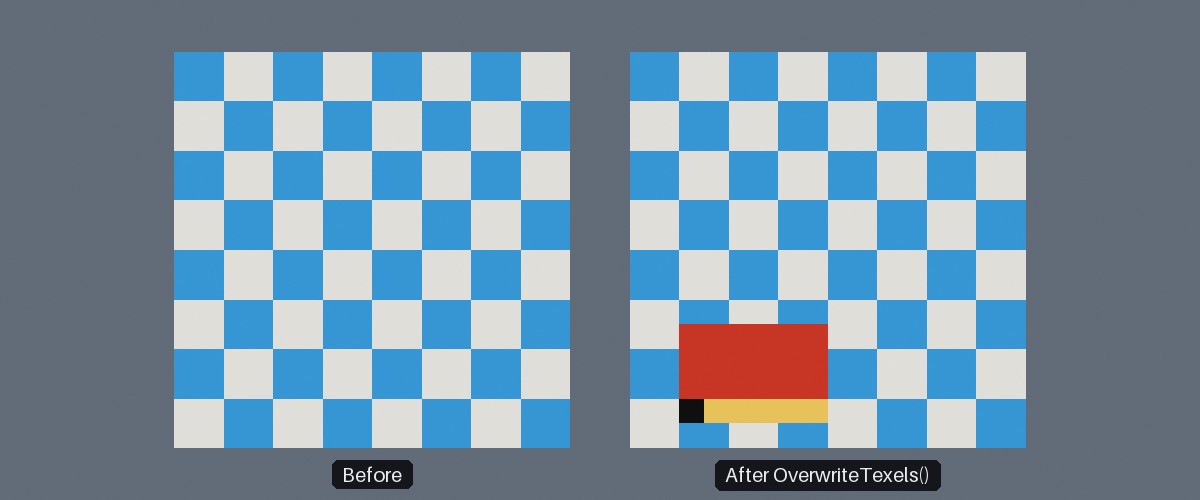
A 16x16 writable texture before (left) and after (right) overwriting a 6x4 region of it at offset (2, 1). The first row of supplied texels is drawn yellow, and the very first texel black.
Writable Textures#
using var texture = factory.TextureBuilder.CreateColorMap(
    TexturePattern.Chequerboard<ColorVect>(StandardColor.Blue, StandardColor.White),
    includeAlpha: false,
    TextureCreationConfig.ForColorMap() with { AllowsDynamicWrites = true } // (1)!
);

// Later...
var regionDimensions = new XYPair<int>(6, 4);
using var texelsLease = factory.ResourceAllocator.BorrowSpan<TexelRgb24>(regionDimensions.Area); // (2)!
var texels = texelsLease.Span;
texels.Fill(TexelRgb24.FromNormalizedFloats(1f, 0f, 0f));

texture.OverwriteTexels<TexelRgb24>(texels, regionDimensions, offset: new XYPair<int>(2, 1)); // (3)!
-
Creates the texture with dynamic writes allowed. Any texture creation or loading function that takes a
TextureCreationConfigcan be used. -
This borrows a span without allocating on the managed heap, thus preventing GC stutter. Explained further in Avoiding GC Stutter.
-
Overwrites a 6x4 region of the texture, starting 2 texels from its left edge and 1 texel from its bottom edge, with red.
By default, a texture's contents are fixed once it's been created. A writable texture is one created with AllowsDynamicWrites set to true in its TextureCreationConfig, which enables its OverwriteTexels() method. This lets you change all or part of the texture's contents at any time, as often as you like, without having to create a new texture. Every material / object using the texture will have its appearance altered.
Writable textures are useful for any imagery that changes while your application runs, for example:
- Procedurally-generated or animated patterns;
- Video frames, or images streamed from another source;
- Surfaces the user can draw or paint on;
- Visualisations of changing data, such as heatmaps, minimaps, or graphs.
Creating Writable Textures#
Almost every texture loading or creation function that accepts a TextureCreationConfig can create a writable texture.
One exception is CreateTextureFromCompressedData(), as compressed textures can never be written to (see Texture Compression); and textures desiring mipmap generation. Mipmaps and compression can not be maintained for data that changes, so setting AllowsDynamicWrites to true also sets GenerateMipMaps to false and CompressionQuality to null. This means it's fine to use AllowsDynamicWrites alongside a preset such as ForColorMap() (as above), but explicitly enabling either of those after setting AllowsDynamicWrites to true will throw an exception.
Overwriting Texels#
A writable texture's dimensions and texel type (RGB or RGBA) are fixed when it's created; only the texels' values can be overwritten. You can check whether an existing texture is writable with its AllowsDynamicWrites property.
A writable texture has two OverwriteTexels() overloads:
-
OverwriteTexels(newTexels) -
Replaces the texture's entire contents.
newTexelsmust contain at least as many texels as the texture (i.e.texture.Dimensions.Area). -
OverwriteTexels(newTexels, dimensions, offset) -
Replaces a rectangular region of the texture, leaving the rest of it as it was. The region is
dimensionstexels in size, and startsoffsettexels from the texture's bottom-left corner.newTexelsmust contain at leastdimensions.X * dimensions.Ytexels.Overwriting only the part of the texture that has changed is cheaper than overwriting all of it.
- Texels are laid out row-by-row, starting from the bottom row, exactly as when creating a texture from texel data. For a region, the first texel supplied is the region's bottom-left texel.
- The texels may be
TexelRgb24orTexelRgba32, regardless of the texture's own texel type; they are converted if necessary. Supplying texels of the same type as the texture avoids the conversion and is better for performance. - The texels are copied as part of the call, so you can reuse or alter your buffer as soon as
OverwriteTexels()returns. - As when creating textures, passing a
Span<TTexel>or an array usually requires specifying the texel type explicitly (e.g.OverwriteTexels<TexelRgb24>(...)).
OverwriteTexels() throws an InvalidOperationException if the texture wasn't created with AllowsDynamicWrites set to true; and an ArgumentOutOfRangeException if the region doesn't lie entirely within the texture (or if newTexels doesn't contain enough texels for the given target region).
Performance
OverwriteTexels() is fast enough for per-frame updates on reasonable numbers of texels, but can quickly expend your frame budget if you're attempting to update multiple mega-pixel-sized textures. Write only to regions you need to update, split large updates across multiple frames, or generate the texels in parallel with OverwriteTexelsParallelized().
Overwritten Texels Are Not Processed
Any ProcessingToApply in the texture's TextureCreationConfig (flipping, negating, swizzling, alpha premultiplication, etc.) is applied only once, when the texture is created. Texels supplied to OverwriteTexels() (or written by OverwriteTexelsParallelized()) are uploaded exactly as given.
In particular, CreateColorMap() (with includeAlpha: true) premultiplies the alpha of the texels it creates, but PrintColorMap() does not. If your writable texture is an RGBA color map that's used by a blending material (see Alpha Premultiplication), premultiply the texels yourself before overwriting (e.g. with TextureUtils.PremultiplyAlphaForTexture() or TexelRgba32.WithPremultipliedAlpha()). Use TextureUtils.ProcessTexture() to apply any other processing (see Processing).
Overwriting Texels in Parallel#
If you generate a texture's texels yourself every frame (e.g. a procedural pattern or a data visualisation), OverwriteTexelsParallelized() lets you generate them across TinyFFR's worker threads instead of on the calling thread alone:
static void FillWaves(Span<TexelRgb24> band, XYPair<int> bandOffset, XYPair<int> bandDimensions, float time) { // (1)!
    for (var i = 0; i < band.Length; ++i) {
        var x = i % bandDimensions.X;
        var y = bandOffset.Y + i / bandDimensions.X; // (2)!
        var brightness = MathF.Sin(x * 0.05f + time) * MathF.Cos(y * 0.05f - time) * 0.5f + 0.5f;
        band[i] = TexelRgb24.FromNormalizedFloats(brightness, 0f, 1f - brightness);
    }
}

// Every frame...
texture.OverwriteTexelsParallelized<TexelRgb24, float>(&FillWaves, totalTime); // (3)!
-
The callback must be a
staticmethod (passed as a function pointer, so calling code must be in anunsafecontext). Anything it needs (here just the time) is passed in as the context argument, rather than captured in a lambda, so that the call doesn't allocate. -
Each invocation is given one band of whole rows.
bandOffset.Yis the row the band starts on (relative to the region being overwritten), andbandOffset.Xis always0. -
The texture is split in to bands that are filled at the same time on TinyFFR's worker threads (the calling thread fills bands too). The method returns once every band has been written and the texture has been updated.
-
OverwriteTexelsParallelized<TTexel, TContext>(blockCallback, context) -
Replaces the texture's entire contents with texels written by
blockCallback.blockCallbackis invoked once per band with(band, bandOffset, bandDimensions, context), and must write every texel in the band. -
OverwriteTexelsParallelized<TTexel, TContext>(blockCallback, context, dimensions, offset) -
Replaces a rectangular region of the texture (exactly as with
OverwriteTexels(newTexels, dimensions, offset)). Each band's offset is relative to the region.
- The bands are written directly in to the memory that's uploaded to the GPU, so (unlike
OverwriteTexels()) no buffer of your own and no copy is needed. IfTTexelisn't the texture's own texel type, each band is converted once it's been written. - Texels are laid out exactly as for
OverwriteTexels(): row-by-row, starting from the bottom row. - The callback runs on worker threads, so it must not call any TinyFFR API, and must only write to the band it's given. See Parallelization for the full rules, and for parallelizing your own work in general.
OverwriteTexelsParallelized()throws the same exceptions asOverwriteTexels(). Any exception thrown by the callback is rethrown on the calling thread once all bands have finished.