Fog
-
 In a nutshell...
- Fog makes distant objects fade to a colour, adding depth and atmosphere to a scene. Fog
- Five presets cover common densities, from a faint haze to a thick fog. Fog Presets
FogDescriptorconfigures fog in full, including fog that pools near the ground. Custom Fog
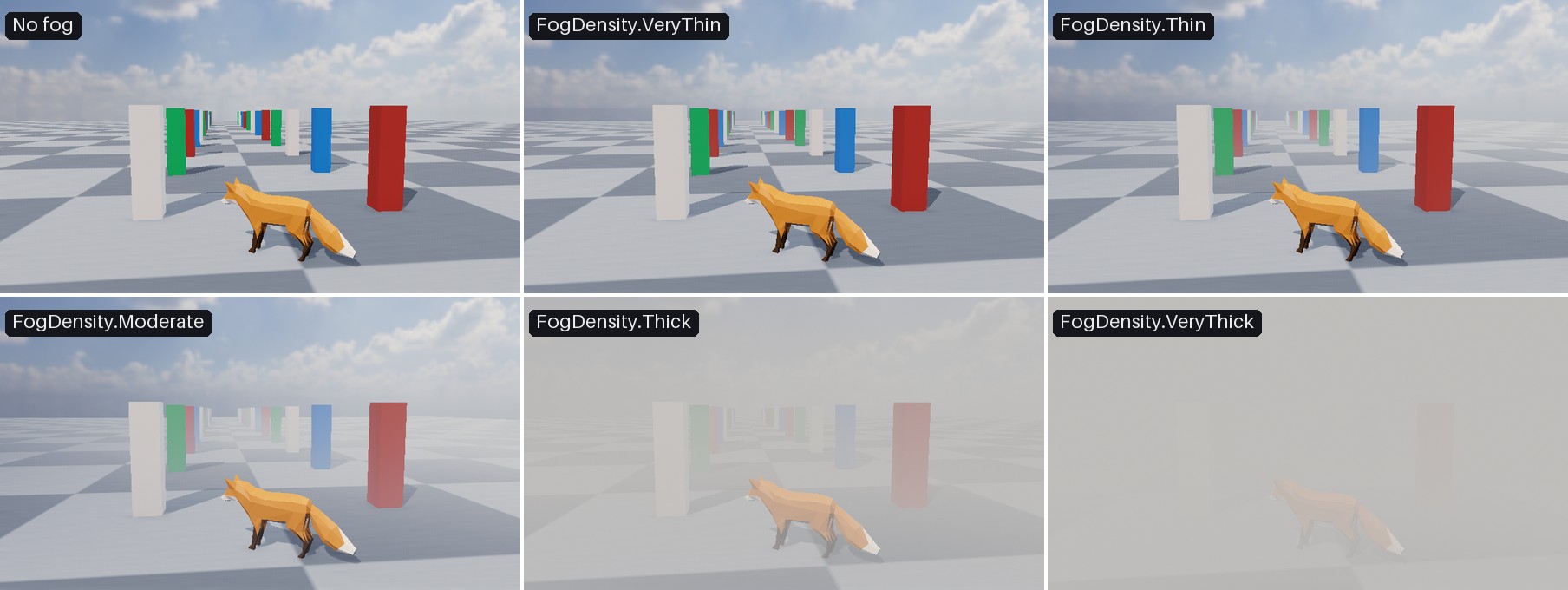
The same scene with no fog, and with each FogDensity preset (using the default fog colour).
Fog#
scene.AddFog(FogDensity.Thin); // (1)!
scene.AddFog(FogDensity.Thick, new ColorVect(0.8f, 0.85f, 0.9f)); // (2)!
scene.RemoveFog(); // (3)!
-
Adds a light haze to the scene.
-
Replaces the haze with a thick, slightly blue fog.
-
Removes the fog from the scene.
Fog makes objects fade in to a colour as they get further from the camera, adding a sense of depth and atmosphere to a scene (or hiding distant parts of a scene altogether).
Scenes can only have one fog configuration active at any one time.
Fog Presets#
scene.AddFog() accepts a FogDensity preset and optionally a colour. Each preset sets the fog colour's alpha itself, so only the red, green, and blue components of a colour passed to AddFog() are used.
Preset Values
Each preset maps to a complete FogDescriptor (see Custom Fog below) with the following values (all other properties are left at their defaults):
| Preset | Color Alpha | DensityMultiplier |
StartDistance |
DirectionalLightScatteringStrengthMultiplier |
SkywardDensityFalloffMultiplier |
OccludesBackdrop |
|---|---|---|---|---|---|---|
VeryThin |
0.55 | 0.5 | 7.5 | 0.333 | 1 | false |
Thin |
0.65 | 0.75 | 5 | 0.666 | 1 | false |
Moderate |
0.75 | 1 | 3 | 1 | 1 | false |
Thick |
0.85 | 1.25 | 1.25 | 1.5 | 0.5 | true |
VeryThick |
1 | 1.5 | 0.5 | 2 | 0.2 | true |
Custom Fog#
For full control, pass a FogDescriptor to scene.AddFog(). You can start from a preset with new FogDescriptor(density) and adjust it with a with expression, or create one from scratch:
scene.AddFog(new FogDescriptor(FogDensity.Thin) with { OccludesBackdrop = true }); // (1)!

scene.AddFog(new FogDescriptor { // (2)!
    Color = new ColorVect(0.9f, 0.9f, 0.9f, 0.9f),
    GroundLayerHeight = 0f,
    SkywardDensityFalloffMultiplier = 3f,
    StartDistance = 1f
});
-
Uses the thin preset, but with the fog also covering the backdrop.
-
A low-lying mist (dense at ground level, and thinning out quickly above it like morning mist in a valley).
A FogDescriptor has the following properties:
-
Color -
The colour of the fog. Defaults to
FogDescriptor.DefaultColor(a translucent grey:(0.75, 0.75, 0.75, 0.75)).The colour's alpha sets how completely the fog can obscure what's behind it. A fully opaque colour eventually hides distant objects altogether, whereas a translucent one only ever tints them.
-
DensityMultiplier -
How quickly the fog thickens with distance, where
1fis the standard rate. Larger values make objects disappear in to the fog over a shorter distance; smaller values stretch that transition out. Defaults to1f. -
StartDistance -
How far from the camera the fog begins, in metres. Nothing closer to the camera than this is affected at all, which keeps nearby objects looking crisp no matter how thick the fog is further out. Defaults to
3f. -
GroundLayerHeight -
The height at which the fog is thickest, measured along
SkywardDirection. Defaults to0f. -
SkywardDensityFalloffMultiplier -
How quickly the fog thins out above
GroundLayerHeight, where1fis the standard rate. Larger values confine the fog to a shallower layer near the ground; smaller values let it extend further upwards.0fgives fog of the same thickness at every altitude. Defaults to1f. -
SkywardDirection -
Which way is "up" for the purposes of
GroundLayerHeightandSkywardDensityFalloffMultiplier. Defaults toDirection.Up. -
DirectionalLightScatteringStrengthMultiplier -
How strongly a directional light appears to scatter through the fog, where
1fis the standard amount. Scattering is what makes fog glow when you look towards the sun, and look flat and grey when you look away from it. Larger values exaggerate the effect;0fmakes the fog look the same in every direction. Defaults to1f. -
OccludesBackdrop -
Whether the fog is also drawn over the scene's backdrop. The backdrop is effectively infinitely distant, so when this is
truethe fog covers it completely, replacing the sky with a wall of fog. Leave itfalsefor fog that objects fade in to whilst the sky remains visible. Defaults tofalse.